
See What Your Work Could Look Like

The Hidden Cost of Makeshift Lab Documentation
It's 3 PM on Thursday, and you have group meeting in an hour.
Your PI just asked you to present last month's Western blot results—the one where you finally got clean bands. You know you documented it. You remember typing it up. But which file?
You open your "Lab_Data" Dropbox folder. Inside: 47 Word documents with names like "Western_blot_June.docx," "WB_protocol_v2.docx," "Results_antibody_test_FINAL.docx." You start clicking. Was it early March or late February? You check the file dates. March 3rd... March 10th... wait, you modified that one last week, but the data is from February. Open another. Not this one. Try another.
Fifteen minutes later, you find it. The protocol is in one document, your observations are in another, and the gel image? That's somewhere in your "Images" folder. You're pretty sure.
Or maybe your system is different. Maybe you're still flipping through spiral-bound notebooks. Maybe you're searching through a Google Drive with 200+ files. Maybe you keep everything in Excel sheets. Maybe it's a combination of all three.
The tool doesn't matter. The problem is the same: You've just wasted 15 minutes looking for work you already did.
If this sounds familiar, you're not alone. And more importantly, those 15 minutes are just the beginning.
The Real Cost Nobody Talks About
Most researchers don't realize how much time they lose to their documentation system. It's death by a thousand cuts—each small inefficiency feels manageable in the moment, but they add up to something staggering.
Conservative estimate: Most researchers lose 5-10 hours every week to documentation overhead.
That's not time spent doing research. That's time spent managing the documentation of research. Time that could be spent at the bench, analyzing data, or (imagine this) leaving the lab before dark.
Let's break down where those hours actually go.
Six Problems Hiding in Plain Sight
1. The Search Spiral
How long does it take you to find a specific experiment from two months ago?
If you use paper notebooks: You grab what you think is the right notebook, flip through pages checking dates, realize you're in the wrong month, grab another notebook, search again.
If you use Word/Google Docs: You scan filenames in your folder, open 3-4 documents that might be right, Ctrl+F search for keywords, realize the protocol is in a different file than your results, open that one too.
If you use Excel: You scroll through rows, check date columns, realize you have three different spreadsheets for different project phases, open each one.
Average time wasted per search: 10-20 minutes
Now multiply that by how many times per week you need to reference old work. For your protocol. For your lab meeting presentation. Because your PI asked a question. Because you're writing up results.
The information is there. It's just imprisoned—whether in chronological pages, scattered files, or disconnected spreadsheets.
2. The Version Chaos
You're using the Bradford assay protocol. But wait—didn't someone modify it last month? Which version are you supposed to use?
Paper notebooks: Original protocol in September notebook, modification notes in November, latest version in this week's entries. Good luck reconstructing the current version.
Digital files: "Bradford_protocol.docx," "Bradford_protocol_v2.docx," "Bradford_protocol_UPDATED.docx," "Bradford_protocol_March_final.docx." Which one is actually current? Who knows.
Email chains: Someone sent an update in email. Another person replied with a correction. A third person has a different version. Now nobody knows which protocol to use.
There's no "current version." There's no "edit history." There's just chaos.
3. The Collaboration Friction
Your PI wants to see your results. Your lab mate needs your protocol. A collaborator asked for your data. You need to include this work in your grant application.
Paper notebooks: Scanning pages (if you have access to a scanner), taking photos with your phone (hope they're legible), or physically handing over your notebook (hope it comes back).
Digital files: Creating email attachments (hope you attached the right version), sharing Dropbox links (hope they have access), copying and pasting into emails (hope you don't introduce errors).
The worst part: After you share it, that version is instantly out of date if you make any changes. Now multiple versions exist in multiple places, and nobody knows which one is current.
Each sharing event is friction. Each friction point is time. Each time cost adds up.
4. The "Where Did I Write That?" Problem
You documented something important. You know you did. But where?
Paper notebooks: It's somewhere in these three notebooks. Maybe on a sticky note. Maybe in the margins. Maybe you ran out of space and continued on a random page later.
Digital system: Is it in the Word doc with your protocol? In the separate Results file? In that email you sent yourself? In the Excel sheet? In your Evernote? In that Google Doc your lab mate shared?
Modern researchers often use 4-5 different tools simultaneously—each capturing different pieces of their work. Nothing connects together. Nothing is searchable across all your data.
5. The Trust Problem
Here's a question: Can you prove when you actually did that experiment?
Paper notebooks: Did you date it? Can anyone verify you didn't write the date later? Can you prove pages weren't added or removed?
Word/Google Docs: File timestamps show when you last modified the document—not when you did the work. You could edit a document today and claim it was done last month. No way to verify.
Excel sheets: Same problem. Modification dates don't prove anything about when the actual work happened.
For academic researchers, this might not matter much. But if you're in an industry working with regulated data, dealing with patents, or facing any kind of audit, this lack of verifiable timestamps is a massive problem.
And even in academia, when publication questions arise or data needs to be verified, you want ironclad proof of when you did what.
6. The Compliance Nightmare
Let's say you need to share your work for publication, patent filing, or regulatory submission.
What they need:
- Complete experimental record
- Clear methodology
- All associated data
- Proof of when work was performed
- Electronic signatures showing review and approval
- Audit trail of any changes made
What you have:
- Scattered across paper notebooks, Word docs, Excel files, email, and Dropbox
- No automatic timestamps
- No signature capability
- No change tracking across documents
- Manual assembly required (hope you don't miss anything)
Even assembling everything takes hours. And you're never quite sure you found it all.
What Your Work Could Look Like Instead
Before we calculate how those problems add up, let's pause for a moment.
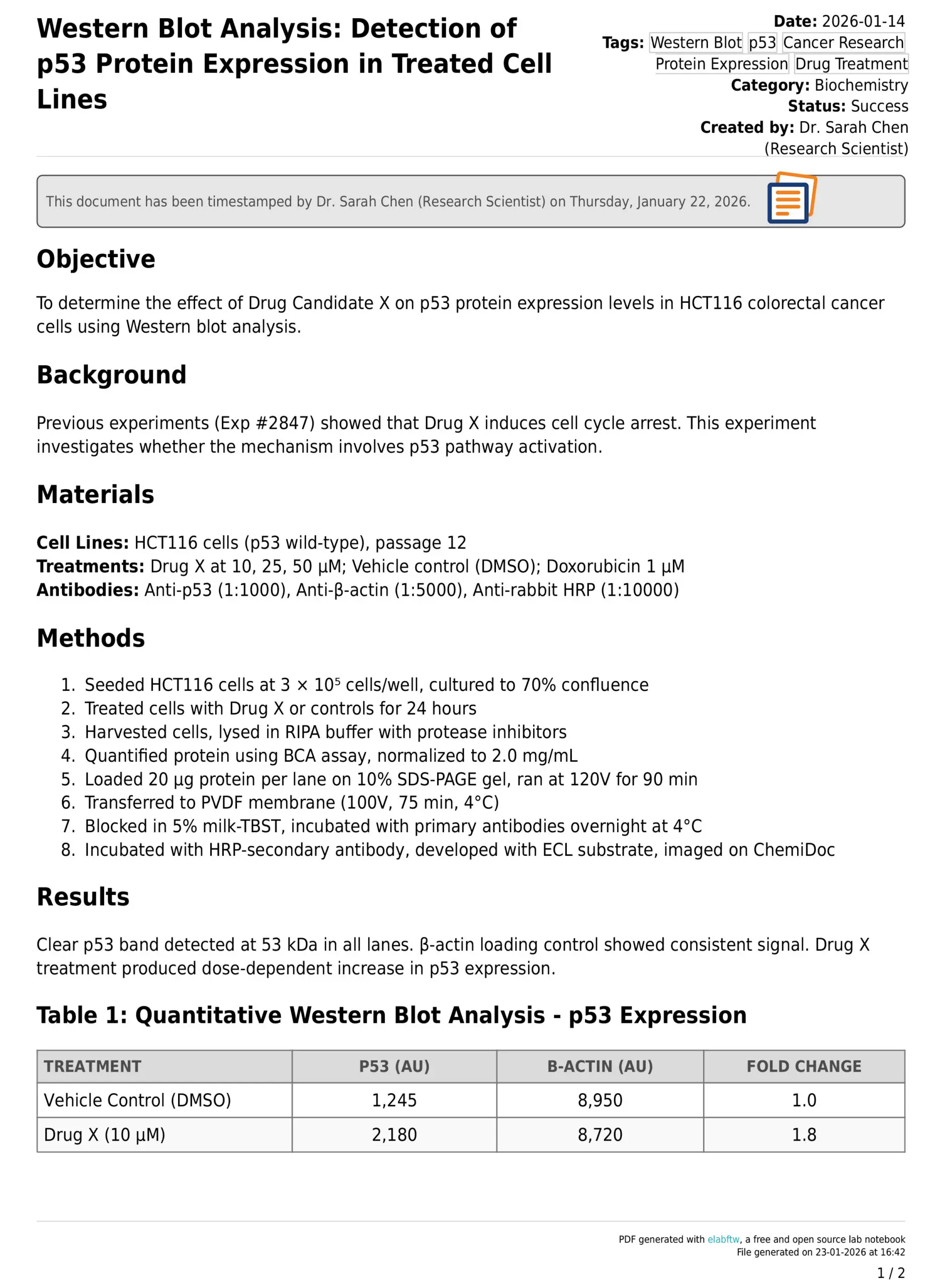
Here's an actual experiment documented in ELabELN—same type of work you're doing right now, just captured in a purpose-built system instead of paper notebooks or Word documents.
Notice what you see here that you can't do with paper notebooks, Word docs, or Excel sheets:
- ✅ Automatic timestamp proving exactly when the work was documented (not just when a file was last modified)
- ✅ Electronic signature from the researcher who performed the work—verifiable and tamper-proof
- ✅ Supervisor approval signature with timestamp—full audit trail built automatically
- ✅ Clean, organized format that's always legible, never lost, instantly searchable
- ✅ Professional export ready for publication, grants, regulatory submissions, or audits
- ✅ All data in one place—protocol, observations, results, linked experiments, file attachments

The Invisible Accumulation
Here's what makes this insidious: none of these problems feel like a crisis in the moment.
Taking 15 minutes to find an old protocol? That's just normal.
Spending time managing Word document versions? That's just what you do.
Emailing files back and forth? Everyone does it.
But let's do the math:
- 15 minutes per day searching for information = 1.25 hours/week
- 20 minutes per week managing file versions and sharing = 0.33 hours/week
- 30 minutes per week dealing with scattered data across tools = 0.5 hours/week
- 45 minutes per week on documentation assembly and compliance = 0.75 hours/week
- Plus the mental load of managing it all
That's 3-5 hours per week minimum. For many researchers, especially those managing multiple projects or collaborating across labs, it's closer to 10 hours.
That's up to 500 hours per year. Imagine what you could do with an extra 500 hours.
You Didn't Cause This Problem
If you're reading this and thinking "wow, I waste so much time," please hear this: This is not your fault.
Paper notebooks worked fine when:
- Experiments were simpler
- Collaboration was less common
- Data volumes were smaller
- Regulatory requirements were lighter
- You weren't expected to publish as frequently
Word/Excel/Dropbox work fine when:
- You're writing a report with a clear beginning and end
- You're creating a presentation
- You're sharing a single document with someone once
But neither system was designed for ongoing laboratory research documentation. They're not built for:
- Linking related experiments across time
- Searching your entire body of work instantly
- Maintaining audit trails automatically
- Collaborating with multiple people on living documents
- Proving when work was actually performed
- Keeping everything organized as your data grows
You're not bad at organization. You're using tools that are fundamentally mismatched to modern research workflows.
What If It Didn't Have To Be This Way?
Here's the good news: None of these problems are actually necessary.
Every single issue we just described—the searching, the version chaos, the collaboration friction, the scattered data, the trust problems, the compliance nightmares—they're all artifacts of using the wrong tools. They're not inevitable features of lab documentation. They're just side effects of trying to make general-purpose tools (notebooks, Word, Excel) do a specialized job they weren't designed for.
Researchers in labs around the world are discovering they can document their work in a fraction of the time, find anything instantly, share with a link, and never worry about lost data or audit trails again.
They're using purpose-built electronic lab notebooks. Not paper. Not Word. Not Excel. Tools actually designed for research documentation.
Next week, we're going to show you exactly what that looks like.
We'll explain what a digital lab notebook actually is (it's simpler than you think), address the common concerns about making the switch (no, you don't need to be tech-savvy), and show you what changes when you stop fighting your documentation system.
Want to read the next article in this series?
We're publishing a new guide every week, and each one goes out first to our newsletter subscribers. Sign up for our newsletter and you'll get each new article delivered as soon as it's published, plus practical tips for making your lab work easier.
Coming next week: "What Is a Digital Lab Notebook? (And Why Researchers Are Switching)"
See What Your Work Could Look Like
ELabELN lets your team document experiments in minutes instead of hours, with advanced collaboration tools, enhanced security, and the features your growing lab needs. Get started today to schedule a demo and leave makeshift documentation behind for good.
"*" indicates required fields
© LabLynx, Inc. All Rights Reserved. LabLynx®, ELabELN™, and related marks are trademarks of LabLynx, Inc. This document may reference or interoperate with third-party technologies including Nextcloud®, ELabFTW®, and Node-RED®, whose respective copyrights, trademarks, and licenses remain the property of their owners. Nextcloud source code and license: https://github.com/nextcloud/server; ELabFTW source code and license: https://github.com/elabftw/elabftw; Node-RED source code and license: https://github.com/node-red/node-red. All third-party software is subject to its own licensing terms. Information provided herein is for informational purposes only and is not legal, technical, or professional advice. Product features and specifications are subject to change without notice.